👩🏼💻 Day8— #100DaysOfCode in Python
Day 8 - Beginner - Function Parameters & Caesar Cipher

I'm starting my journey as a Data scientist. I am also Senior UX Designer specialized in dataviz. Experience in predictive modeling, data cleansing, feature engineering, data visualization and pipeline building.
Today's Goals:
Learn enough to build a Caesar Cipher
To build it, I had to tackle some skills, like working with Functions with inputs, For and While loops and much more! 👩🏼💻
What I’ve seen:
📌 Functions with Inputs
What I Learned Today:
Function with Inputs
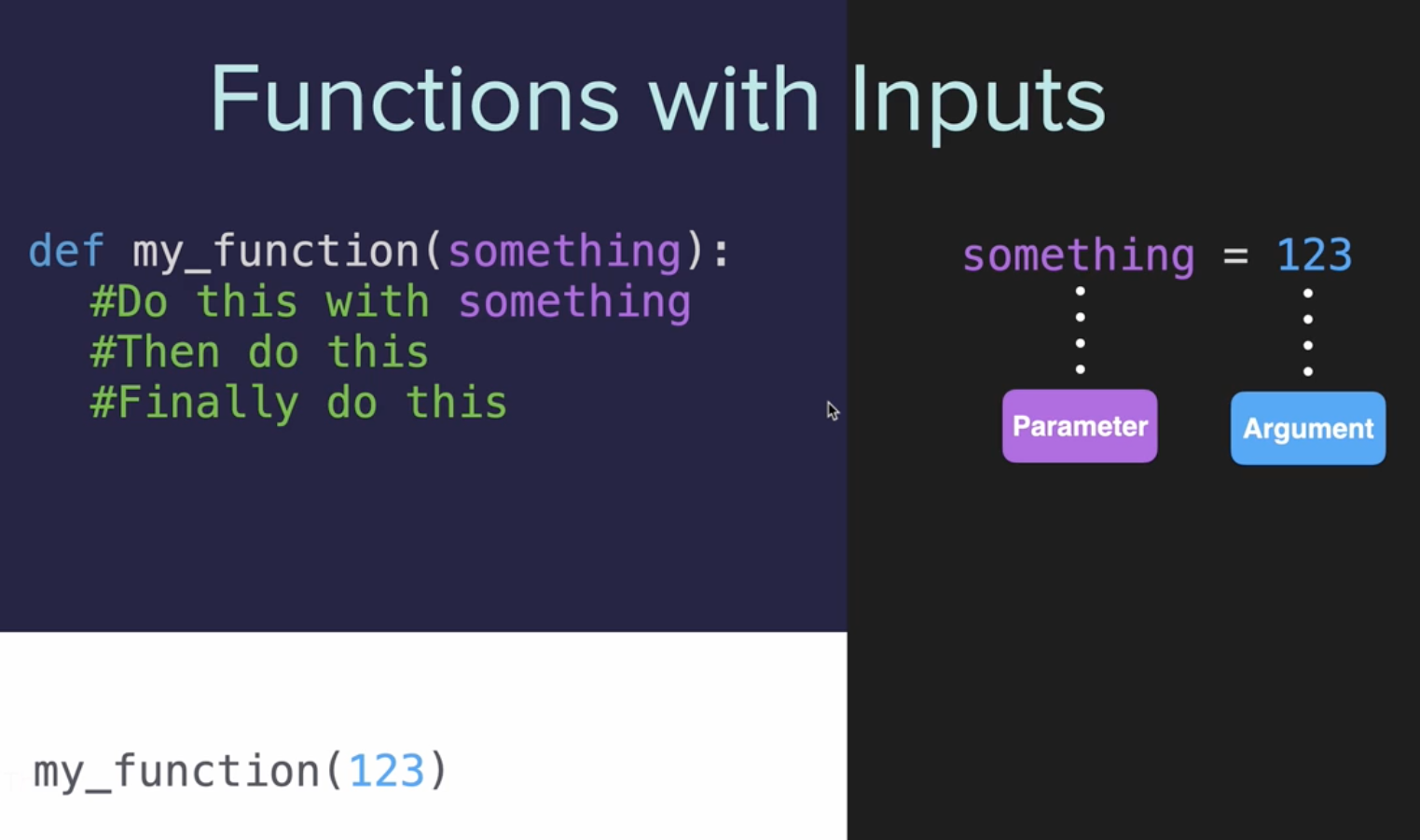
In Python, functions with inputs, also known as arguments or parameters, are used to perform a task or calculation that can vary based on the input values provided. Here's a brief explanation:
Definition: As already explained in the entry of day 6, a function in Python is defined using the
defkeyword, followed by the function name and parentheses. Inside the parentheses, you can specify one or more inputs (parameters).Parameters: These are the variables listed inside the parentheses in the function definition. They act as placeholders for the values that will be passed to the function when it is called.
Calling a Function: To use a function, you call it by its name and pass the required arguments inside the parentheses. The arguments you pass must match the number and type expected by the function.
Function Body: Inside the function, the parameters can be used like regular variables. The code block within the function performs operations using these parameters.
Return Value: A function can return a value using the
returnstatement. The function ends when thereturnstatement is executed or when the function's code block is completed.
Example:
def add_numbers(a, b):
    return a + b

result = add_numbers(5, 3)
print(result)  # This will print 8
In this example, add_numbers is a function with two inputs, a and b. When called with values 5 and 3, it returns their sum, which is 8.
Functions with inputs are fundamental in Python programming as they allow for code reusability and modular programming, making it easier to manage and maintain complex codebases.
Functions With More Than 1 Argument
In Python, functions can have multiple arguments, allowing them to accept and process more than one piece of data at a time. Here are key points to understand when working with functions that have more than one argument:
1) Defining a Function with Multiple Arguments: When you define a function, you can specify as many arguments as needed, separated by commas. For example:
def add_numbers(a, b, c):
    return a + b + c
This function add_numbers is defined to take three arguments: a, b, and c.
2) Positional Arguments: In the function definition, each argument is a positional argument. The order in which you pass these arguments when calling the function is crucial. For the above function, when you call add_numbers(1, 2, 3), 1 is assigned to a, 2 to b, and 3 to c.
3) Calling a Function with Multiple Arguments: When calling the function, you must provide the exact number of arguments expected, unless the function is designed to handle default values or variable numbers of arguments. For example, calling add_numbers(1, 2) will result in an error because the function expects three arguments.
4) Mixing Argument Types: Functions can have a mix of positional arguments, keyword arguments (which have a default value and are optional), and arbitrary argument lists. For instance:
def create_profile(name, age, country="Unknown"):
    print(f"Name: {name}, Age: {age}, Country: {country}")
Here, name and age are positional arguments, whereas country is a keyword argument with a default value of "Unknown".
5) Variable Number of Arguments: You can design a function to accept a variable number of arguments using *args for positional arguments and **kwargs for keyword arguments. For example:
def var_args_function(*args):
    for arg in args:
        print(arg)
This function can accept any number of positional arguments.
6) Combining All Types: A function can combine positional arguments, keyword arguments with default values, args, and *kwargs. However, the order of these in the function definition is important: positional arguments, followed by keyword arguments, args, then *kwargs.
7) Example with More than One Argument:
def calculate_distance(speed, time):
    return speed * time

distance = calculate_distance(60, 2)  # speed = 60, time = 2
print(distance)  # Output will be 120
Understanding these concepts is crucial for effectively using and defining functions in Python, especially when dealing with complex data manipulation or operations that require multiple inputs.
Positional Arguments
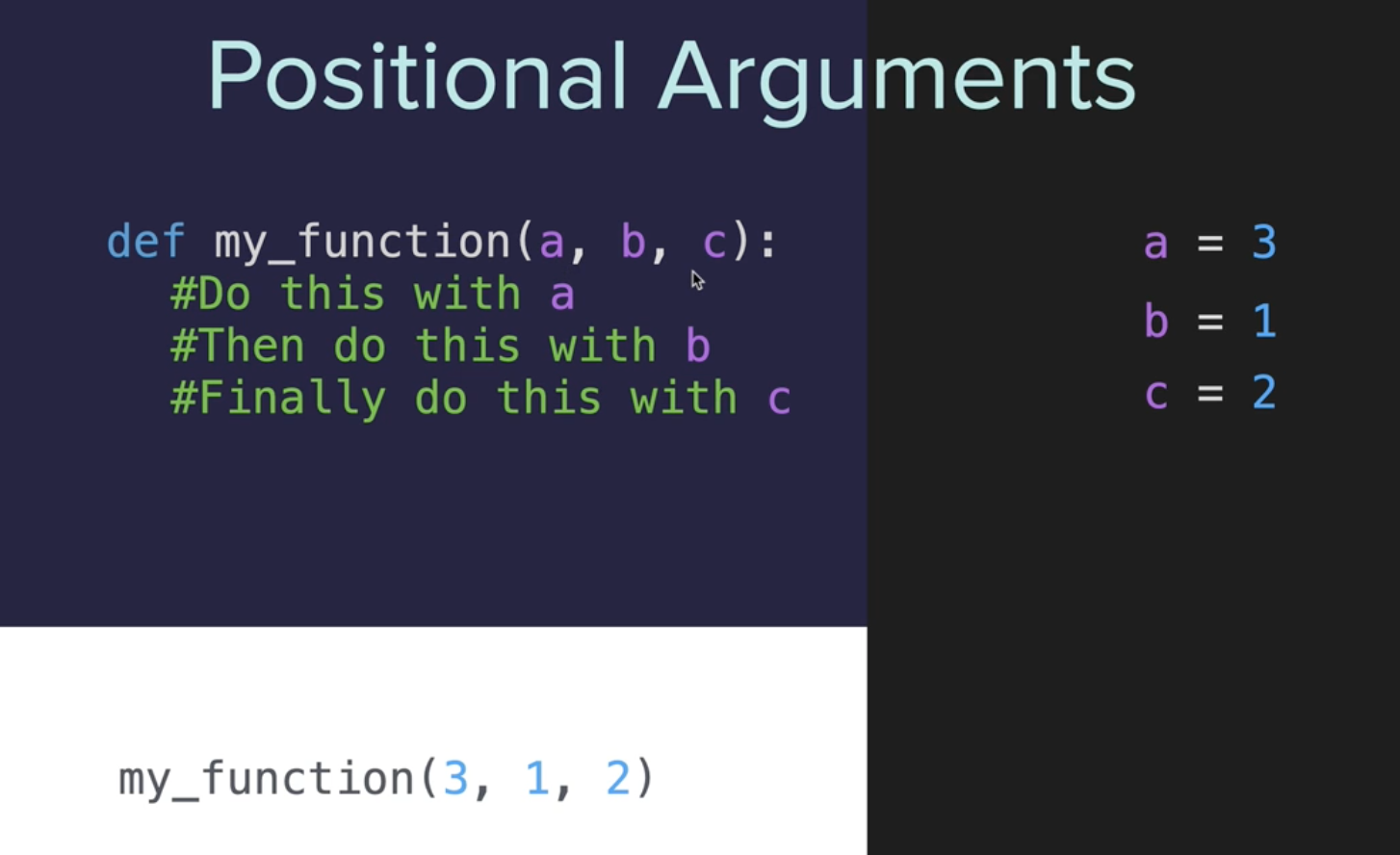
Positional arguments in Python functions are a fundamental concept. Here's a breakdown of what you need to know:
1) Definition: Positional arguments are arguments that need to be passed to a function in the correct order. The order in which you pass these arguments matters because Python assigns each value to the corresponding parameter in the function definition based on their order.
2) Function Definition: When defining a function, you list positional arguments first. For example:
def my_function(arg1, arg2, arg3):
    # Function body
Here, arg1, arg2, and arg3 are positional arguments.
3) Calling Functions: When you call a function, you must provide the positional arguments in the same order as they were defined. For instance:
my_function(value1, value2, value3)
In this call, value1 is assigned to arg1, value2 to arg2, and so on.
4) Importance of Order: The most critical aspect of positional arguments is their order. If you change the order of the arguments when calling the function, you might end up with unexpected results or errors, as different values will be assigned to the parameters.
5) Combining with Other Types of Arguments: Positional arguments can be combined with keyword arguments in a function. Keyword arguments are specified by name when the function is called, which makes the order irrelevant for them. However, positional arguments must always precede keyword arguments in both the function definition and the call.
Example:
def greet(first_name, last_name):
    print(f"Hello, {first_name} {last_name}!")

greet("Jane", "Doe")  # Correct usage
greet("Doe", "Jane")  # Incorrect usage; prints "Hello, Doe Jane!"
And now, what if you wanted to be more clear when you actually call the function, so you don’t ever encounter this problem? Well, you could use something called **Keyword Arguments** instead. So now, instead of just adding the arguments into the function call like this:
def my_function(a, b, c):
    #Do this with a
    #Then do this with b
    #Finally do this with c

my_function(1, 2, 3)
We can actually add each of the parameter names and an equal sign to say explicitly to which parameter each argument corresponds.
Let's review this in more detail.
Keyword Arguments
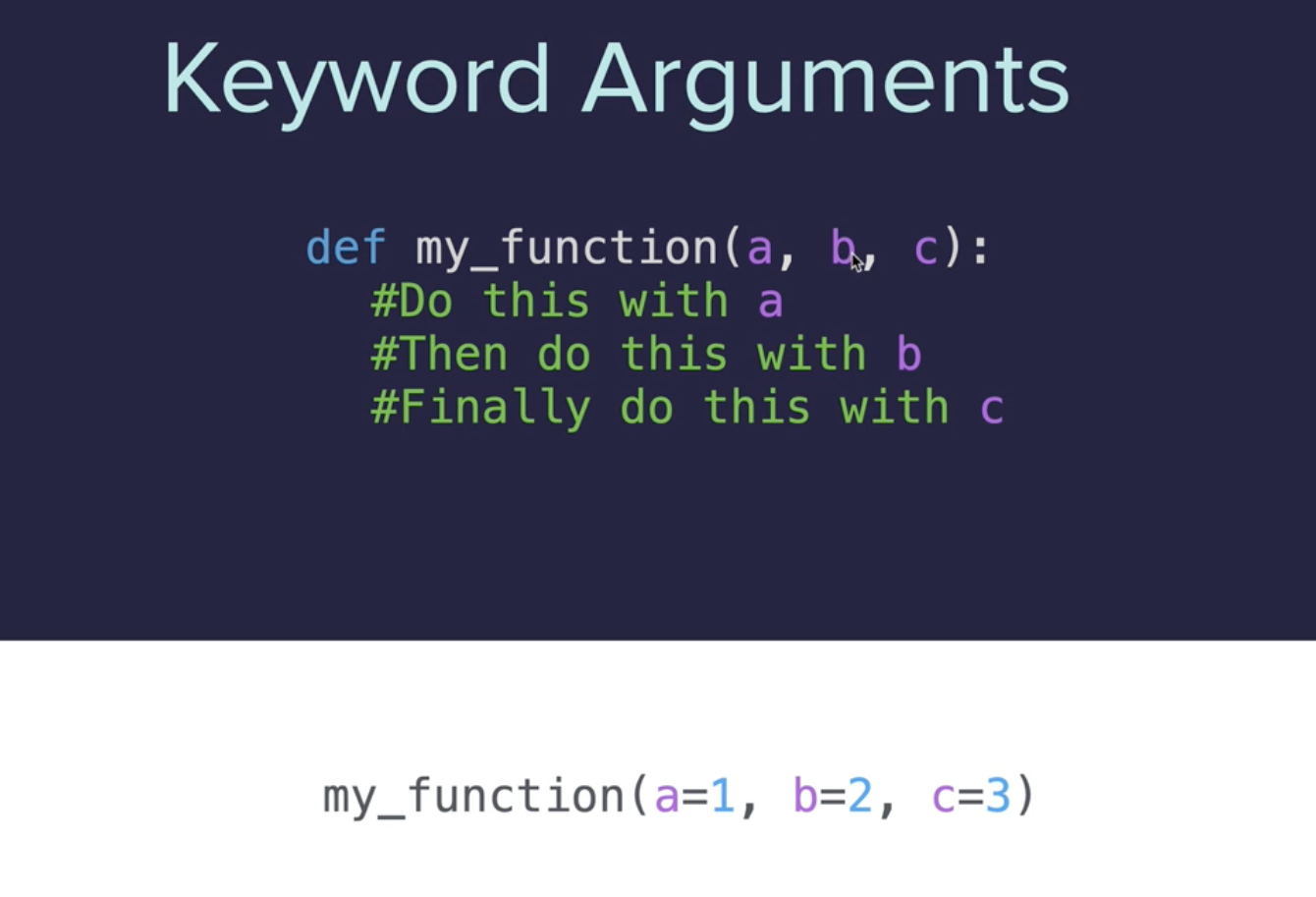
Keyword arguments in Python functions add flexibility and clarity to how functions are called and defined. Here's what you need to know about keyword arguments:
1) Definition: Keyword arguments are arguments passed to a function, preceded by an identifier. Unlike positional arguments, where order matters, keyword arguments are identified by the parameter name, making the order of the arguments irrelevant.
2) Function Definition: Just like positional arguments, keyword arguments are defined in the function's definition. For example:
def greet(name, greeting="Hello"):
    print(f"{greeting}, {name}!")
In this function, name is a positional argument, and greeting is a keyword argument with a default value of "Hello".
3) Using Keyword Arguments: When calling a function, you can specify keyword arguments using the syntax parameter_name=value. For instance:
greet(name="Alice", greeting="Hi")
Here, name and greeting are both specified as keyword arguments. You could also call greet("Alice", greeting="Hi"), where Alice is passed as a positional argument and greeting as a keyword argument.
4) Default Values: One of the main advantages of keyword arguments is that you can assign default values to them. If the caller does not provide a value for a keyword argument, the default value is used. In the greet function above, if greeting is not specified, "Hello" will be used.
5) Flexibility in Function Calls: With keyword arguments, you can skip some arguments (provided they have default values) or change the order in which arguments are passed without affecting how the function operates. This adds clarity and flexibility to function calls.
6) Combining Positional and Keyword Arguments: Functions can have both positional and keyword arguments. However, positional arguments must always come before keyword arguments in both the function definition and the function call.
Example:
def make_coffee(size, coffee_type="espresso", sugar=0):
    print(f"Making a {size} cup of {coffee_type} with {sugar} sugar(s).")

make_coffee("large")  # Uses default coffee_type and sugar
make_coffee("medium", sugar=2)  # Specifies sugar, uses default coffee_type
7) Keyword-Only Arguments: Python also allows for keyword-only arguments, which are arguments that can only be specified by their keyword and not as positional arguments. This is achieved by using an asterisk * in the function definition.
8) Readability: Keyword arguments can make function calls more readable and clear. By using the parameter names, it's easier to understand the role of each value in a function call.
Keyword arguments are particularly useful in functions with a large number of parameters or when default values can simplify function calls. They enhance the readability and maintainability of Python code.
Code Samples:
Exercises
You are painting a wall. The instructions on the paint say that 1 can of paint can cover 5 square meters of wall. Given a random height and width of wall, calculate how many cans of paint you'll need to buy.
number of cans = (wall height x wall width) ÷ coverage per can.
e.g. Height = 2, Width = 4, Coverage = 5
number of cans = (2 * 4) / 5 = 1.6
But because you can't buy 0.6 of a can of paint, the result should be rounded up to 2 cans.
Solution:
# Write your code below this line 👇
import math
def paint_calc(height, width, cover):
  num_of_cans = (height * width) / cover
  round_up_cans = math.ceil(num_of_cans)
  print(f"You'll need {round_up_cans} cans of paint.")


# Write your code above this line 👆
# Define a function called paint_calc() so the code below works.

# 🚨 Don't change the code below 👇
test_h = int(input()) # Height of wall (m)
test_w = int(input()) # Width of wall (m)
coverage = 5
paint_calc(height=test_h, width=test_w, cover=coverage)
Project: Caesar Cipher
Interesting link:
Well, knowing the basis of the Functions with Inputs, now it’s time to work on Caesar Cipher, but to build this program, we must know what it means and its application to achieve today’s goal.
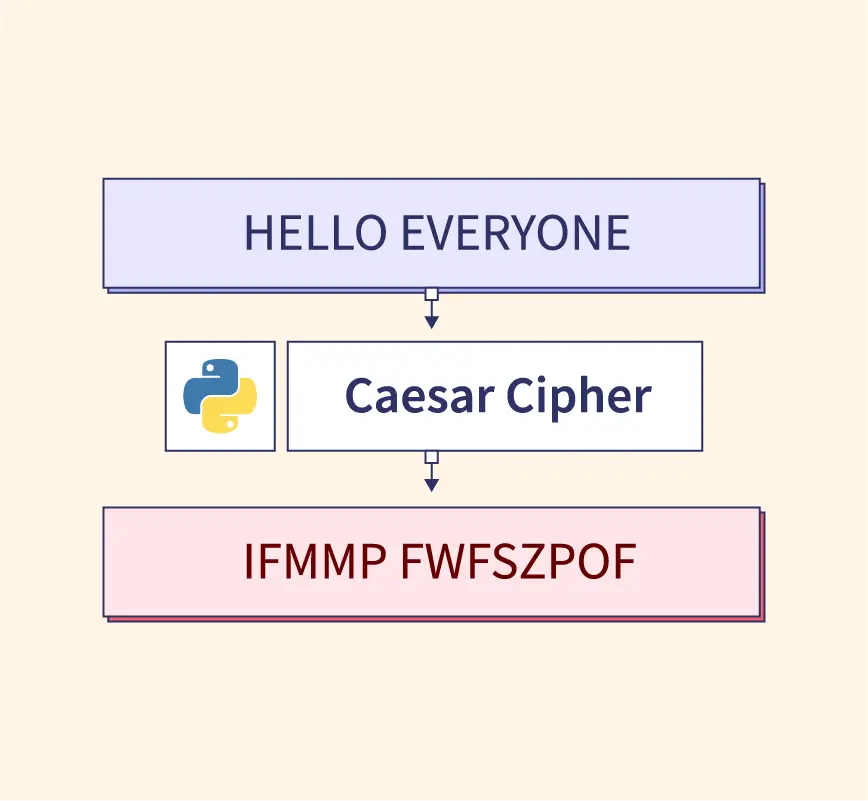
The Caesar Cipher is a simple and well-known encryption technique used in cryptography. Named after Julius Caesar, who reportedly used it in his private correspondence, the Caesar Cipher is a type of substitution cipher where each letter in the plaintext is shifted a certain number of places down or up the alphabet.
Here's how the Caesar Cipher works:
1) Shift Value: Choose a number, known as the shift or key. This number determines how many places each letter in the plaintext will be shifted.
2) Encryption:
For each letter in the plaintext, move it forward in the alphabet by the shift value.
If the shift moves past the end of the alphabet, it wraps around to the beginning.
Non-alphabetic characters (like spaces, numbers, and punctuation) are typically not changed.
The process is case-sensitive, meaning that upper and lower case letters are shifted separately.
3) Decryption:
To decrypt, the process is reversed.
Each letter in the ciphertext is moved backwards in the alphabet by the shift value.
Example:
Suppose the shift value is 3.
The plaintext "HELLO" would be encrypted as "KHOOR" (H->K, E->H, L->O, L->O, O->R).
The Caesar Cipher is a very basic form of encryption and is easily broken with modern techniques, such as frequency analysis because it doesn't significantly alter the structure of the plaintext. However, it remains a popular introductory example for learning about encryption and coding in cryptography due to its simplicity.
In Python, you can implement a Caesar Cipher by defining functions for encryption and decryption and using the ASCII values of characters to perform the shift, taking care to wrap around the alphabet and maintain the case of each letter.
Project:
This project has been divided into x parts in order to find the solution clearly and to consolidate the knowledge obtained in the previous days.
Step 1
Encryption
Defined an
encryptfunction to shift each letter of the input text forward in the alphabet.Managed the shift directly by adding the shift amount to the letter index.
Optimization:
You handled the alphabet wrap-around by duplicating the alphabet in the list, which allows for a straightforward calculation of the new letter positions without needing additional logic for wrapping around.
alphabet = ['a', 'b', 'c', 'd', 'e', 'f', 'g', 'h', 'i', 'j', 'k', 'l', 'm', 'n', 'o','p', 'q', 'r', 's', 't', 'u', 'v', 'w', 'x', 'y', 'z', 'a', 'b', 'c', 'd', 'e', 'f', 'g', 'h', 'i', 'j', 'k', 'l', 'm', 'n', 'o', 'p', 'q', 'r', 's', 't', 'u', 'v', 'w', 'x', 'y', 'z']

direction = input("Type 'encode' to encrypt, type 'decode' to decrypt:\n")
text = input("Type your message:\n").lower()
shift = int(input("Type the shift number:\n"))

#TODO-1: Create a function called 'encrypt' that takes the 'text' and 'shift' as inputs.

#TODO-2: Inside the 'encrypt' function, shift each letter of the 'text' forwards in the alphabet by the shift amount and print the encrypted text.
#e.g.
#plain_text = "hello"
#shift = 5
#cipher_text = "mjqqt"
#print output: "The encoded text is mjqqt"

##HINT: How do you get the index of an item in a list:
#https://stackoverflow.com/questions/176918/finding-the-index-of-an-item-in-a-list

##🐛Bug alert: What happens if you try to encode the word 'civilization'?🐛

#TODO-3: Call the encrypt function and pass in the user inputs. You should be able to test the code and encrypt a message.


#Step 1
def encrypt(plain_text, shift_amount):
    #Step2
    cipher_text = ""
    for letter in text:
        letter_index = alphabet.index(letter)
        new_letter_position = letter_index + shift_amount
        new_letter = alphabet[new_letter_position]
        cipher_text += new_letter


    print(f"The encoded text is {cipher_text}")

#Step3
encrypt(plain_text=text, shift_amount=shift)
Step 2
Decryption
Introduced a
decryptfunction, which is essentially the reverse ofencrypt.Shifted each letter of the input text backwards in the alphabet.
Used a conditional structure to call either
encryptordecryptbased on user input.
Optimization:
You maintained symmetry between the
encryptanddecryptfunctions, which is good for readability and maintenance.The conditional structure for choosing between encryption and decryption makes the program more user-friendly and versatile.
alphabet = [
    'a', 'b', 'c', 'd', 'e', 'f', 'g', 'h', 'i', 'j', 'k', 'l', 'm', 'n', 'o',
    'p', 'q', 'r', 's', 't', 'u', 'v', 'w', 'x', 'y', 'z', 'a', 'b', 'c', 'd',
    'e', 'f', 'g', 'h', 'i', 'j', 'k', 'l', 'm', 'n', 'o', 'p', 'q', 'r', 's',
    't', 'u', 'v', 'w', 'x', 'y', 'z'
]

direction = input("Type 'encode' to encrypt, type 'decode' to decrypt:\n")
text = input("Type your message:\n").lower()
shift = int(input("Type the shift number:\n"))


def encrypt(plain_text, shift_amount):
    cipher_text = ""
    for letter in plain_text:
        if letter in alphabet:
            letter_index = alphabet.index(letter)
            new_letter_index = letter_index + shift_amount
            new_letter = alphabet[new_letter_index]
            cipher_text += new_letter
        else:
            cipher_text += letter
    print(f"The encoded text is {cipher_text}")


#TODO-1: Create a different function called 'decrypt' that takes the 'text' and 'shift' as inputs.
#TODO-2: Inside the 'decrypt' function, shift each letter of the 'text' *backwards* in the alphabet by the shift amount and print the decrypted text.
#e.g.
#cipher_text = "mjqqt"
#shift = 5
#plain_text = "hello"
#print output: "The decoded text is hello"
#TODO-3: Check if the user wanted to encrypt or decrypt the message by checking the 'direction' variable. Then call the correct function based on that 'drection' variable. You should be able to test the code to encrypt *AND* decrypt a message.


# Decrypt Step 1
def decrypt(cipher_text, shift_amount):
    # Decrypt Step 2
    plain_text = ""
    for letter in cipher_text:
        if letter.isalpha():
            letter_index = alphabet.index(letter)
            new_letter_index = letter_index - shift_amount
            plain_text += alphabet[new_letter_index]
        else:
            plain_text += letter
    print(f"The decoded text is {plain_text}")


# Decrypt Step 3
if direction == "encode":
    encrypt(plain_text=text, shift_amount=shift)
elif direction == "decode":
    decrypt(cipher_text=text, shift_amount=shift)
Step 3
Optimization
Combined
encryptanddecryptinto a singlecaesarfunction, reducing code duplication.Introduced a modulo operation (
% 26) to handle shifts larger than the alphabet length and to ensure the index stays within bounds.
Optimization:
Combining the functions into one
caesarfunction is a significant optimization for code maintainability. It reduces repetition and makes the program easier to extend or modify.The use of
% 26is a more standard way to handle wrapping in the cipher, removing the need for the duplicated alphabet and making the function more efficient and less prone to errors.
alphabet = ['a', 'b', 'c', 'd', 'e', 'f', 'g', 'h', 'i', 'j', 'k', 'l', 'm',
            'n', 'o', 'p', 'q', 'r', 's', 't', 'u', 'v', 'w', 'x', 'y', 'z']

#TODO: Combine the encrypt() and decrypt() functions into a single function called caesar().
def caesar(start_text, shift_amount, cipher_mode):
  end_text = ""
  shift = shift_amount % 26

  for letter in start_text:
    if letter in alphabet: #this is the same that if letter.isalpha()
      letter_position = alphabet.index(letter).lower()
      if cipher_mode == "encode":
        new_letter_position = (letter_position + shift) % 26 # Ensure index is within bounds after shifting
      elif cipher_mode == "deocde":
        new_letter_position = (letter_position - shift) % 26
      new_char = alphabet[new_letter_position]
      end_text += new_char.upper() if letter.isupper() else new_char
    else:
      end_text += letter  # Non-alphabetic characters are added as is

  return f"Here's the {cipher_mode}d result: {end_text}"


#TODO: Import and print the logo from art.py when the program starts.
from art import logo
print(logo)

#TODO: Can you figure out a way to ask the user if they want to restart the cipher program?
#e.g. Type 'yes' if you want to go again. Otherwise type 'no'.
#If they type 'yes' then ask them for the direction/text/shift again and call the caesar() function again?
#Hint: Try creating a while loop that continues to execute the program if the user types 'yes'.
should_continue = True

while should_continue:
  direction = input("Type 'encode' to encrypt, type 'decode' to decrypt:\n")
  text = input("Type your message:\n")
  shift = int(input("Type the shift number:\n"))

  #TODO: Call the caesar() function, passing over the 'text', 'shift' and 'direction' values.
  caesar(start_text=text, shift_amount=shift, cipher_mode=direction)

  result = input("Type 'yes' if you want to go again. Otherwise type 'no'.\n")
  if result.lower() == 'no':
      should_continue = False
Additional Notes:
The final structure of your program with the
whileloop is excellent for continuous user interaction.Using
letter in alphabetas a condition is good, but you might consider usingletter.isalpha()for clarity and to handle upper and lower case letters.In your
caesarfunction, there's a type in theelifclause: "decode" should be "decode".Ensure that the alphabet handling is case-insensitive by converting input letters to lowercase for index lookup, then restoring their original case when adding them to the output string.
Overall, these steps show a thoughtful progression in building a functional and user-friendly Caesar Cipher program. The final version, with its combined caesar function and loop for continuous operation, represents a well-optimized and efficient implementation.
Thanks! 🫶🏻
📌 Now you can also find me at the following links:


