👩🏼💻 Day6 — #100DaysOfCode in Python
Day 6 — Beginner — Python Functions & Karel

I'm starting my journey as a Data scientist. I am also Senior UX Designer specialized in dataviz. Experience in predictive modeling, data cleansing, feature engineering, data visualization and pipeline building.
Today’s Goals:
Learn Functions and the While Loop and put them into practice to solve this class project: Escaping the Maze game. 👩🏼💻
What I Already Know:
📌 Functions
📌 While loop
What I Learned Today:
Functions
🔗 Some interesting links:
Built-in FunctionsNaming Styles and best practices for coding
Overview about functions in Python
In Python, functions are fundamental building blocks of reusable code. There are two main types of functions: built-in functions and user-defined functions.
Built-in Functions: These are functions that are pre-defined in Python and are always available for use. They provide basic functionalities and are part of Python’s standard library. Examples include
print(),len(),range(),sum(),min(),max(), andtype(). These functions are universally known by Python, meaning you don't need to import a module or define them before using them. They are designed to provide common operations that are universally applicable across various types of data.User-Defined Functions: These are functions that you define yourself in your code. You use the
defkeyword to create these functions. User-defined functions allow you to encapsulate code for a specific task that you can reuse multiple times in your program. They are useful for breaking down complex problems into simpler, more manageable parts. User-defined functions can be as simple or complex as needed, and they can accept parameters and return values.
The key differences between built-in and user-defined functions are:
Origin: Built-in functions are an integral part of Python and are always available, whereas user-defined functions are created by the programmer within a script or module.
Purpose: Built-in functions cover generic tasks and are designed for general use. User-defined functions are tailored to the specific needs of your program.
Availability: Built-in functions don’t require any special import statements or definitions. User-defined functions must be defined before they are used in your code.
Both types of functions are fundamental to Python programming, providing the ability to perform tasks efficiently and making the code more modular and readable.
User-Defined Functions
Even though we will deal with built-functions in our day, most of the time we will have to create our own functions. Here’s an overview of how they work:
1)Definition: A function in Python is defined using the def keyword, followed by a function name, parentheses (), and a colon :. Inside the parentheses, you can define parameters (or arguments) that the function can accept. The function body, which contains the code to be executed, is indented under the function definition.
Example:
def greet(name):
    print("Hello, " + name + "!")
2) Calling a Function: To execute a function, you “call” it by writing the function’s name followed by parentheses. If the function requires arguments, you pass them inside the parentheses.
Example:
greet("Alice")
3) Return Statement: Functions can return values using the return statement. If no return statement is used, the function returns None by default.
Example
def add(a, b):
    return a + b
4) Parameters and Arguments: Parameters are variables listed inside the parentheses in the function definition, while arguments are the values passed to the function when it is called.
5) Default Parameters: You can provide default values for parameters, which are used if no argument is passed for that parameter.
Example:
def greet(name="World"):
    print("Hello, " + name + "!")
6) Keyword Arguments: When calling a function, you can specify arguments by the name of their corresponding parameters, allowing you to ignore the order of parameters.
Example:
add(b=2, a=1)
7) Variable Scope: Variables defined inside a function are local to that function and cannot be accessed outside of it. Similarly, a function does not have access to local variables of another function unless they are passed as arguments.
8) Docstrings: You can include a documentation string (docstring) in your function to describe what the function does. This is enclosed in triple quotes and is optional but recommended for readability and maintenance.
Example:
def add(a, b):
    """Return the sum of a and b."""
    return a + b
9) Anonymous Functions (Lambda Functions): Python supports the creation of anonymous functions (i.e., functions that are not bound to a name) using the lambda keyword. These are useful for short, throwaway functions.
Example:
square = lambda x: x * x
10) Recursion: Functions can call themselves. This is known as recursion and is useful for certain kinds of problems, but it must be used with care to avoid infinite recursion.
In summary, functions in Python are versatile and can be used to modularize and reuse code, making programs more organized, readable, and maintainable.
While Loop
Differences between For and While loop
Before discussing the particularities of While loop, it is important to note the differences between For and While loops.
The primary difference between for and while loops in Python lies in how they control the flow of execution based on conditions:
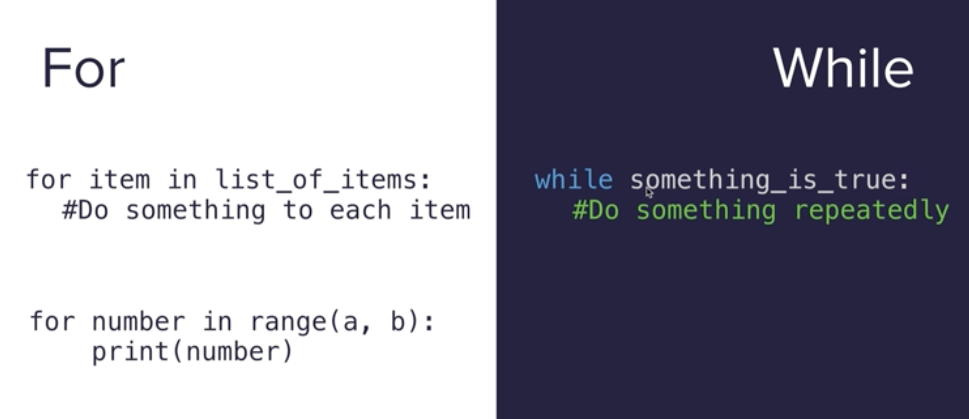
Delving into the While Loop
The while loop in Python is a control flow statement that allows code to be executed repeatedly based on a given Boolean condition. Here's how it works:
1)Basic Structure: The while loop starts with the keyword while, followed by a condition. If the condition is True, the code block under the loop is executed. After the code block is executed, the condition is checked again, and if it's still True, the code block is executed once more. This process continues until the condition becomes False.
Example:
count = 0
while count < 5:
    print(count)
    count += 1
2) Condition: The condition for a while loop is a Boolean expression. The loop continues to execute as long as this condition remains True. As soon as the condition evaluates to False, the loop stops.
3) Infinite Loops: If the condition of a while loop never becomes False, the loop will run indefinitely, creating what is known as an infinite loop. This is usually not desired and can be avoided by ensuring that the condition will eventually evaluate to False.
4) Loop Control Statements: Inside a while loop, you can use control statements like break and continue. break is used to exit the loop immediately, regardless of the condition. continue skips the remaining code inside the loop for the current iteration and goes back to the condition check.
Example with break:
count = 0
while True:
    print(count)
    count += 1
    if count >= 5:
        break
Example with continue:
count = 0
while count < 5:
    count += 1
    if count == 3:
        continue
    print(count)
5) Nested Loops: You can nest while loops within each other. This means you can have a while loop inside another while loop. However, nested loops should be used with caution as they can easily become complex and difficult to maintain.
6) Use Cases: The while loop is useful when you need to repeat a set of operations an unknown number of times until a certain condition is met. Common use cases include waiting for user input, processing data until a certain condition is reached, or running background tasks.
In summary, while loops in Python provide a flexible way to repeat actions based on dynamic conditions, making them essential for many programming scenarios where the number of iterations is not known beforehand.
Code Sample:
While Loop Exercises:
1)Counting Up
- Objective: Write a program that counts from 0 to 4 using a
whileloop.
#Solution

count = 0
while count <= 4:
    print(count)
    count += 1
2) User-Controlled Loop
- Objective: Create a loop that continues to ask the user for a number and prints it, until the user enters ‘0’.
#Solution

while True:
    user_input = input("Enter a number (0 to exit): ")
    if user_input == '0':
        break
    print(user_input)
3) Sum of Entered Numbers
- Objective: Write a program that continually asks the user to enter a number and adds it to a total sum. The loop stops when the user enters ‘done’, and then the program prints the total sum.
#Solution


total_sum = 0
while True:
    user_input = input("Enter a number (or 'done' to finish): ")
    if user_input == 'done':
        break
    try:
        number = float(user_input)
        total_sum += number
    except ValueError:
        print("Please enter a valid number.")

print(f"Total sum: {total_sum}")
Function practice
1)Simple Greeting Function with a While Loop
- Objective: Write a function that greets a user by name. Use a
whileloop to keep asking for the user's name and greet them, until they enter 'exit'.
# Solution

def greet(name):
    print(f"Hello, {name}!")

while True:
    name = input("Enter your name (type 'exit' to stop): ")
    if name == 'exit':
        break
    greet(name)
2) Function to Check Prime Numbers
- Objective: Create a function that checks if a number is prime. Use a
whileloop to keep asking the user for numbers and check if they are prime until the user enters '0'.
# Solution

def is_prime(number):
    if number <= 1:
        return False
    i = 2
    while i*i <= number:
        if number % i == 0:
            return False
        i += 1
    return True

while True:
    num = input("Enter a number to check (0 to exit): ")
    num = int(num)
    if num == 0:
        break
    if is_prime(num):
        print(f"{num} is a prime number.")
    else:
        print(f"{num} is not a prime number.")
3) Function for Fibonacci Sequence
- Objective: Write a function that generates the Fibonacci sequence up to a given number. Use a
whileloop to keep asking the user for a number and then print the Fibonacci sequence up to that number.
def fibonacci_sequence(limit):
    a, b = 0, 1
    while a < limit:
        print(a, end=" ")
        a, b = b, a + b
    print()

while True:
    num = input("Enter a number for Fibonacci sequence (or 'done' to exit): ")
    if num == 'done':
        break
    num = int(num)
    fibonacci_sequence(num)
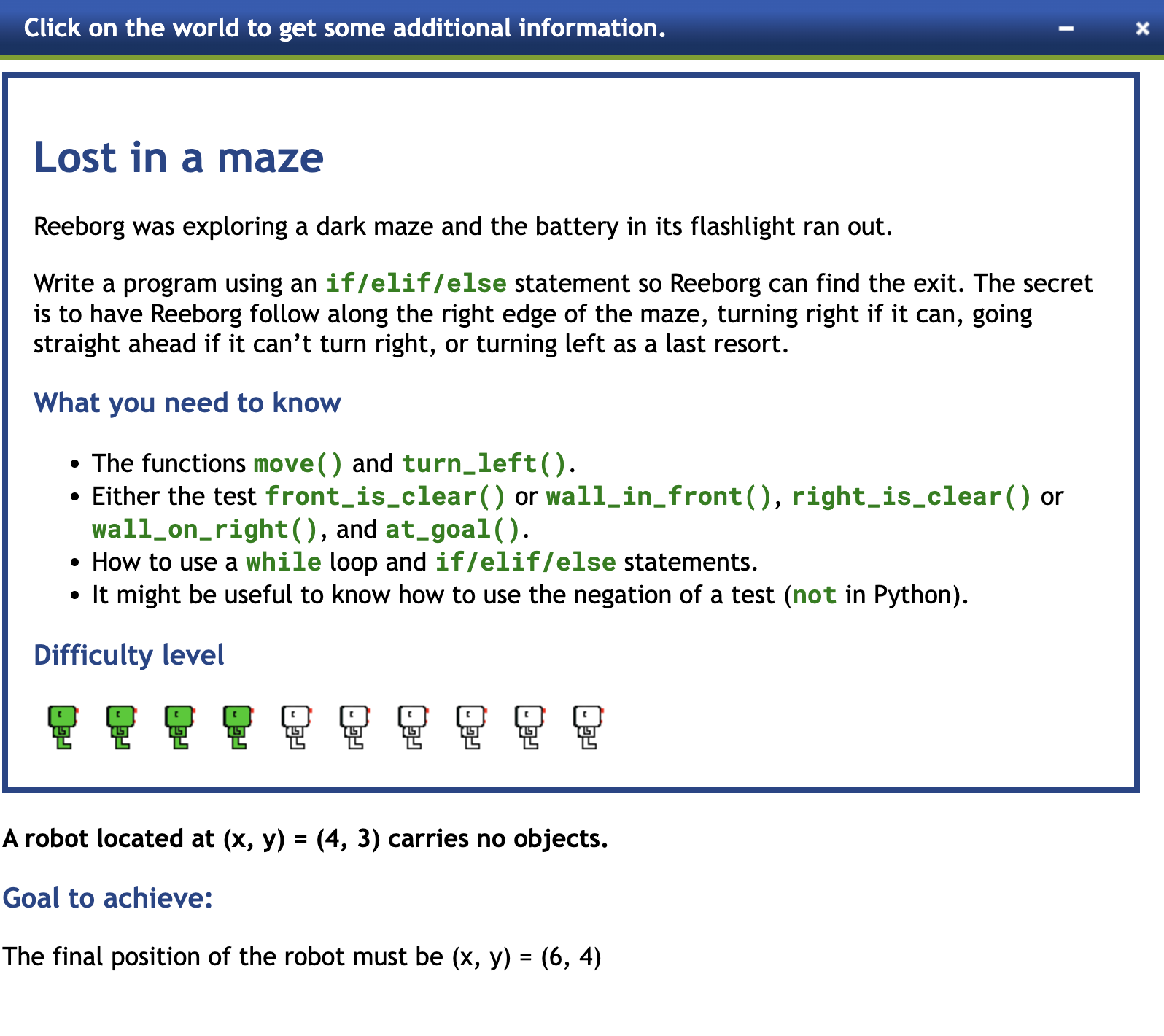
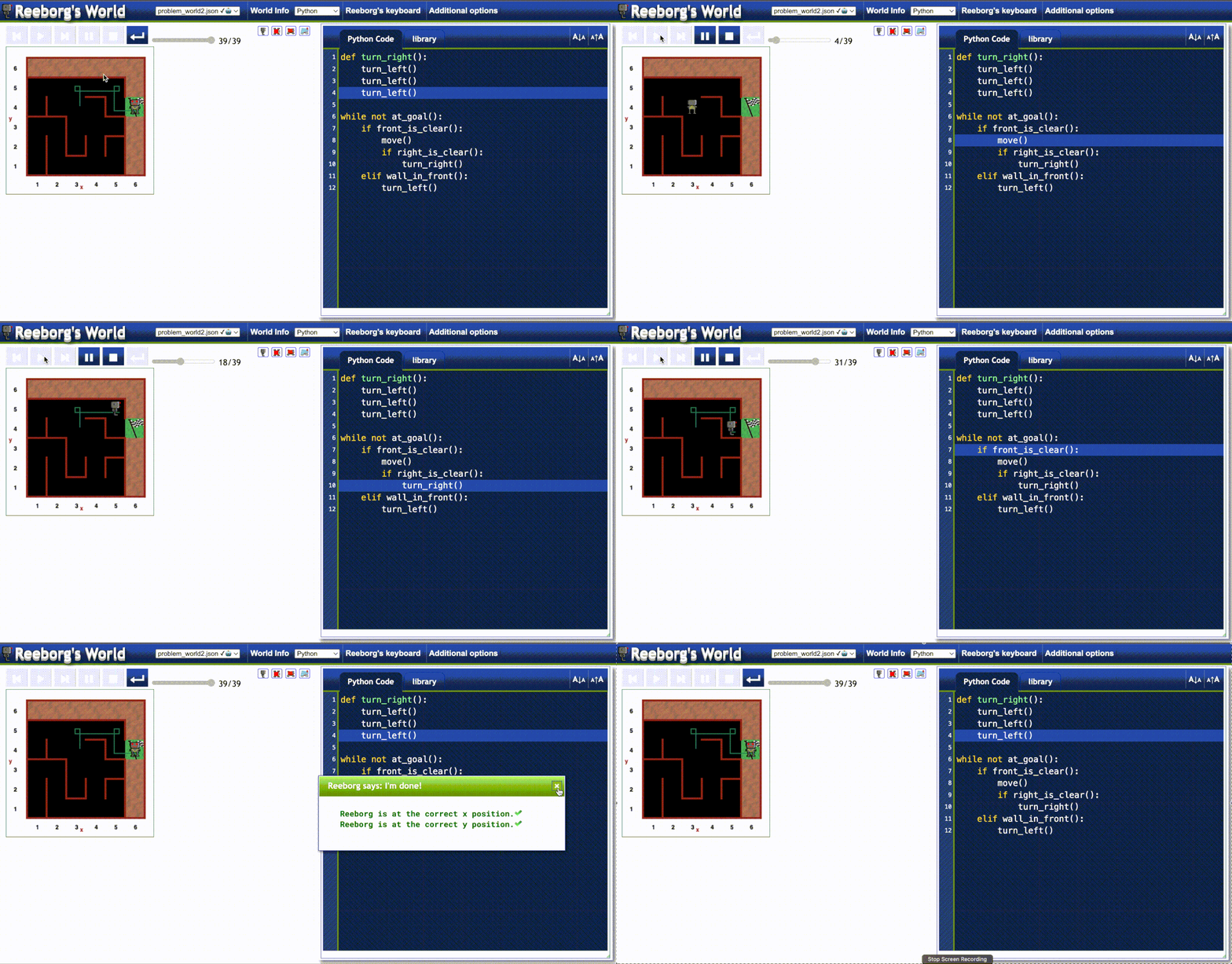
Project: Escaping the Maze
This practice has been carried out with the Reeborg.ca platform, which is designed to teach beginners how to learn to program.
Thanks 🫶🏻
📌Now you can also find me at the following links:


